When Sage 50 payroll not working, the problem can appear in several different ways. Payroll may fail to calculate, employee taxes may remain blank or incorrect, payroll may stop processing, or the issue may begin after a Sage 50 software or payroll tax update. Because these symptoms can have different causes, there is no single fix that works for every payroll problem.
The first thing I recommend is identifying where the failure occurs. Does it affect one employee, several employees, or everyone? Are gross wages calculating while taxes are missing, or is the entire paycheck failing to calculate? Did the problem begin after an update?
Sage 50’s payroll service supports payroll processing and federal and state payroll tax calculations, so checking the payroll service, tax updates, employee setup, and formulas can help narrow down the cause.
Why Is Sage 50 Payroll Not Working?
Before changing payroll formulas or reinstalling anything, determine what has actually stopped working. The symptom often tells you which part of the payroll setup needs attention.
| Problem | Possible cause |
| Payroll is not calculating | Payroll settings, employee setup, tax configuration, or update issue |
| Employee taxes are not calculating | Employee tax information or payroll tax configuration |
| Payroll works for some employees but not others | Employee-specific setup or missing information |
| Payroll won’t calculate for anyone | Company-wide payroll configuration, update, or subscription issue |
| Payroll stopped after an update | Software update, payroll tax update, or tax-year configuration |
| Payroll tax calculations could not be found | Missing or incorrect payroll tax information or formulas |
| Payroll subscription isn’t working | Subscription or payroll service status |
| Payroll update fails | Update, installation, permissions, or connectivity issue |
Sage’s own U.S. resources specifically list payroll not calculating for any employees and payroll tax calculations could not be found among common payroll issues. Its product and tax update troubleshooting resources also identify update and activation-related problems as separate issues worth checking.
The most useful diagnostic question is simple: Is the problem limited to certain employees, or does it affect the entire payroll? That distinction can prevent you from changing employee records unnecessarily.
Read More: Sage 50 Subscription Has Expired
How to Fix Sage 50 Payroll Not Working
The safest way to troubleshoot payroll is to work from the employee setup outward. Start with the basic payroll information, then check tax information and updates, and finally verify the payroll subscription and processing environment.
Step 1: Check Payroll and Employee Setup
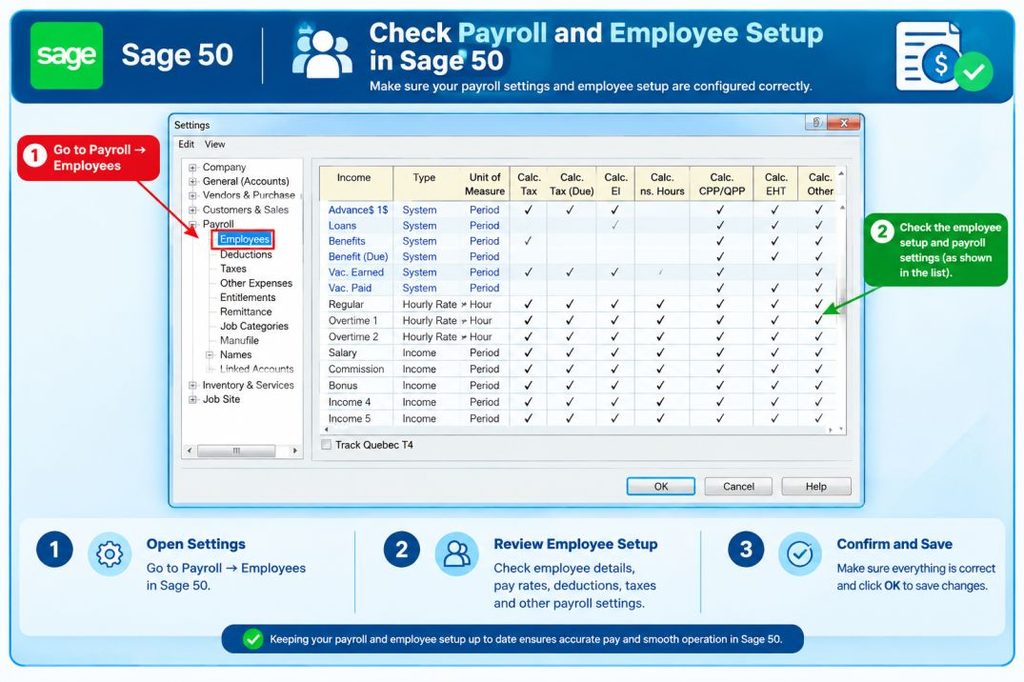
If Sage 50 payroll is not calculating for some employees, start with the affected employee records rather than changing company-wide payroll settings. Sage’s troubleshooting information identifies several employee-level conditions that can prevent expected payroll calculations, including missing hours for an hourly employee, a pay type without a rate, incorrect salary information, inappropriate employee defaults, or gross pay that does not trigger a particular tax.
For an affected employee, review the payroll information under: Maintain → Employees/Sales Reps → Select the employee → Pay Info, Check the following:
- Hours entered for hourly employees
- Pay rate associated with the selected pay type
- Salary information for salaried employees
- Employee payroll defaults
- Tax-related information
- Applicable deductions and benefits
- Whether the employee is configured to use the appropriate defaults
Do not assume that every employee should have identical tax or deduction settings. Individual circumstances can affect how payroll is calculated. After correcting an obvious setup issue, create a test paycheck and check whether gross pay and applicable taxes now calculate. This gives you a controlled way to determine whether the employee-level change addressed the problem.
If Sage 50 payroll is not calculating for any employees, take a different approach. Do not start editing every employee record. Sage’s troubleshooting guidance points toward checking the supported software version, payroll subscription, tax updates, and payroll configuration when calculations fail across the entire employee list.
Step 2: Check Payroll Tax Information and Updates
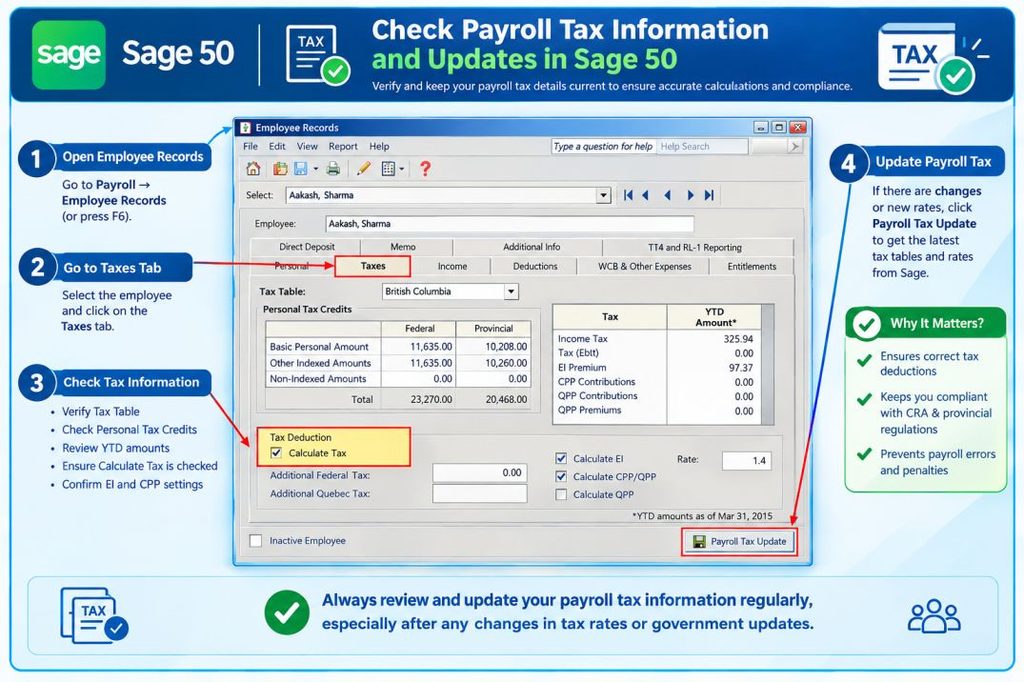
If gross pay calculates but taxes do not, or Sage reports that payroll tax calculations could not be found, the next step is to check the installed tax service and payroll formulas. Sage provides a specific process for checking the installed tax service and Sage-maintained formulas:
- Open Help → About Sage 50 Accounting.
- Check the Installed Tax Service and confirm that the appropriate tax year is installed.
- Go to File → Payroll Formulas → Sage-Maintained Formulas.
- Confirm that the expected current-year formulas are present.
- Go to Maintain Default Information → Employees.
- Review the employee and company tax fields.
- Check that the appropriate calculation settings and formulas are selected.
- Review affected employee records and confirm that Use Defaults is selected where appropriate.
This is more useful than simply telling someone to “check payroll formulas.” It gives you a specific path for identifying whether the formulas are actually available and whether employees are using the intended settings.
Sage’s current 2026 documentation also confirms that payroll tax updates are released during the tax year. For example, Sage announced a July 2026 payroll tax update for Sage 50 U.S. Edition Release 2026 and instructed users to verify the installed tax-update version through Help → About Sage 50 Accounting. Don’t manually change tax formulas without checking first
A Sage 50 payroll calculation error does not automatically mean that you should create or modify a formula yourself. Sage distinguishes between Sage-maintained and user-maintained payroll formulas. If a required tax formula is missing, verify the applicable update and the formula status before attempting a manual change. For jurisdiction-specific payroll calculations, making an unsupported formula change can create a different payroll problem instead of solving the original one.
When a required local tax formula is unavailable or the situation is unclear, use Sage’s official documentation or support resources for guidance rather than guessing at tax rates or limits.
Step 3: Check Sage 50 Updates, Payroll Subscription, and Processing
If the employee setup and tax formulas look correct, move on to the Sage 50 software and payroll service.
Check the payroll subscription
A Sage 50 payroll subscription not working can prevent automatic payroll calculations. Sage states that its payroll subscription provides payroll processing and federal and state payroll tax calculations.
If payroll is not calculating for anyone, verify that the payroll service is active and that your account has the required payroll subscription. Depending on your Sage 50 installation, the subscription information can be refreshed through: Help → Sage 50 Subscription Updates → Online → OK
Then test payroll again. Sage’s current documentation also explains that payroll requires a plan that includes payroll and the latest update for automatic federal, state, and most local tax calculations.
Check for payroll tax updates
If you are experiencing a Sage 50 payroll update not working problem, check for available updates before changing payroll formulas. The standard update path is: Services → Check for Updates → Check Now
If an update is available, download it and close Sage 50 when prompted so the installation can complete. Sage’s current U.S. payroll update resources identify supported payroll tax updates and provide installation guidance. If an update does not appear or the installation does not proceed normally, follow Sage’s documented update troubleshooting process rather than repeatedly changing payroll settings.
Verify the installed tax update
After the update has been installed, return to: Help → About Sage 50 Accounting, Check the installed tax-update information. This verification step matters because downloading an update and successfully installing the applicable payroll tax update are not necessarily the same thing. You want to confirm what Sage 50 actually has installed before testing payroll again.
Sage 50 Payroll Not Calculating for Some Employees
When payroll works for some employees but not others, the problem is more likely to be connected to the affected employee records than to the entire Sage 50 payroll system. A useful approach is to choose one employee whose payroll calculates correctly and compare that employee with an affected employee.
What to compare
Look for differences in:
- Pay type
- Pay rate or salary
- Pay frequency
- Hours or earnings
- Federal tax information
- State or local tax information
- Deductions
- Benefits
- Payroll defaults
- Recent employee-record changes
For example, suppose hourly Employee A calculates correctly but Employee B does not. Before changing company-wide tax settings, compare their pay information and tax configuration. If Employee B has no hours entered or the selected pay type does not have an appropriate rate, the problem may be specific to that employee.
Do not copy another employee’s entire payroll setup blindly. Tax withholding, deductions, benefits, and other payroll information can be specific to the individual employee. If the affected employee’s setup appears correct, move to the current payroll tax update and formula checks.
Read More: Sage 50 Login issue
Sage 50 Payroll Not Calculating for Any Employees
When Sage 50 payroll is not calculating for any employees, treat it as a company-wide troubleshooting issue. Start with these areas:
- Payroll tax information
- Payroll tax updates
- Sage 50 software version
- Payroll subscription or service status
- Company payroll settings
- Current-year payroll formulas
- Exact error message
- Whether the issue began after an update or configuration change
Sage specifically lists payroll not calculating for any employees as a common payroll issue and separately identifies tax-update and product-update problems that can affect payroll calculations.
| What you’re seeing | What to investigate |
| No payroll calculation at all | Payroll and company setup |
| Gross pay calculates but taxes don’t | Payroll tax information and updates |
| Payroll update fails | Update or service issue |
| Subscription message appears | Payroll subscription status |
| Problem began after an update | Software or tax-update configuration |
| Specific error appears | The exact error message and named formula |
This approach is important because changing every employee record will not correct a company-wide tax-update or subscription problem.
Sage 50 Payroll Not Working After an Update
If Sage 50 payroll not working after update is the problem, first determine what changed. A Sage 50 software update and a payroll tax update can require separate checks. Before changing employee settings or payroll formulas, confirm the installed version and tax-update status.
1. Check the Sage 50 Version
Open Help → About Sage 50 Accounting and check:
- The installed Sage 50 version or release.
- Whether the expected software update was completed.
- The installed payroll tax-update information.
- Whether the problem started immediately after the update.
If the installed version is not what you expected, complete the appropriate Sage 50 update before troubleshooting payroll further.
2. Check Payroll Tax Updates Separately
A Sage 50 software update does not mean that every payroll-tax issue has automatically been resolved.
- Open Help → About Sage 50 Accounting.
- Check the installed payroll tax-update information.
- Confirm that the applicable tax-year update is installed.
- If you see a Sage 50 payroll tax update error, note the exact message before changing payroll formulas.
- Test payroll again after confirming the update.
Sage released multiple 2026 payroll tax updates, so checking the installed tax-update information is particularly important when troubleshooting 2026 payroll calculations.
3. Look at the Exact Error
Always record the exact error message before trying additional fixes.
For example: “Payroll tax calculations could not be found.” provides much more useful information than: “Payroll isn’t working.” The exact message can help you determine whether the problem is related to:
- A missing payroll formula
- A payroll tax update
- A subscription or service
- Employee configuration
- A Sage 50 payroll calculation error
This makes it easier to choose the correct troubleshooting path instead of changing unrelated payroll settings.
What to Do When Sage 50 Payroll Still Won’t Calculate
If payroll continues to fail after checking the employee setup, payroll tax information, updates, and subscription, avoid making random changes. Instead, collect the information needed to identify the remaining problem.
- Exact Sage 50 error message
- Sage 50 version
- Installed payroll tax-update information
- Payroll period being processed
- Check date
- Whether the issue affects one employee or everyone
- Whether gross pay, taxes, or both are missing
- Whether the problem began after an update
- Whether the payroll subscription is active
- What troubleshooting steps you have already tried
This information makes the problem much easier to investigate. If the issue remains after the relevant setup, update, and subscription checks, consult Sage’s official support and documentation or a qualified Sage/payroll professional. Payroll calculations affect employee compensation and tax reporting, so it is better to verify an unresolved calculation problem than to force payroll through with unsupported changes.
How to Prevent Sage 50 Payroll Problems
Once you have resolved a payroll issue, a few simple habits can make future problems easier to catch.
1. Keep Sage 50 and Payroll Updates Current
Payroll rules can change during the tax year. Sage publishes payroll tax updates to address applicable federal, state, and local changes. Its 2026 update announcements demonstrate that payroll updates can occur at different points during the year.
Before processing payroll for a new tax period, check that your Sage 50 installation has the applicable update.
2. Review Employee Payroll Information Regularly
Employee records can change over time. Review payroll information when there are changes to:
- Pay rates
- Employment status
- Tax information
- Benefits
- Deductions
- Pay frequency
- State or local work information
Keeping these details accurate reduces the chance of an employee-specific calculation problem.
3. Check Payroll Before the Final Submission
Do not wait until payroll is finalized to notice that something looks wrong. Review calculated payroll for:
- Missing employee calculations
- Unexpected tax amounts
- Missing deductions
- Unusual changes compared with previous payrolls
- Unexpected gross-pay differences
If something looks unusual, investigate it before finalizing payroll.
4. Keep Track of Payroll Errors
When an error appears, save the exact wording and note when it occurred. For example, record whether the issue started:
- After a software update
- After a payroll tax update
- After changing an employee
- At the beginning of a new tax year
- After a subscription or service change
A short record like this can save significant troubleshooting time later.
Conclusion
When Sage 50 payroll not working, the most important step is to identify where the calculation fails. Start with employee setup when only certain employees are affected. Move to payroll tax information and formulas when taxes are missing. Then check Sage 50 updates and payroll tax updates, followed by subscription or service status when the issue affects everyone.
The goal is not to change as many settings as possible. It is to find the specific point where payroll stopped calculating and correct that issue using supported information. That approach helps protect the accuracy of employee pay and payroll tax calculations while making troubleshooting much more manageable.
FAQ of Sage 50 Payroll not Working:
No. Sage currently lists payroll as a subscription/add-on for Sage 50 Pro Accounting rather than treating it as automatically included with the base accounting plan. If you need automatic payroll tax calculations, verify that your account has a plan or payroll subscription that includes payroll.
Yes. Sage lists Payroll subscription available for Sage 50 Premium Accounting. However, having the Premium Accounting edition does not by itself mean that every payroll service is active; you should verify that the payroll subscription associated with the account is current.
Yes. Sage lists payroll as available with its Sage 50 accounting plans, including Quantum. Quantum provides additional capabilities such as expanded user access and role-based permissions, while payroll remains dependent on having the applicable payroll subscription or plan.
Changing the accounting edition and having an active payroll service are separate considerations. If payroll stopped calculating after an edition upgrade, verify that the payroll subscription is active and that the applicable payroll tax update is installed. Sage’s payroll troubleshooting resources specifically include situations where taxes stop calculating or a plan appears expired after an upgrade.
Sage currently offers Sage 50 Desktop bundles with Payroll, including Pro Accounting with Payroll and Premium Accounting with Payroll. Sage also states that payroll pricing is tiered according to the number of employees. Therefore, check your specific Desktop bundle or payroll subscription rather than assuming that every Desktop installation includes payroll.
The products have different delivery models. Sage describes Sage 50 Cloud as a cloud-first solution with automatic updates and access from any device, while Sage 50 Desktop is installed locally. Both product lines offer payroll options, but the applicable subscription and update requirements depend on the product you use.
A new Sage 50 installation does not automatically mean that payroll tax calculations are enabled. Sage’s 2026 documentation states that users need a plan that includes payroll and the latest update for federal, state, and most local taxes to calculate automatically. Without the required payroll subscription, taxes and deductions may need to be calculated and entered manually.
Payroll tax updates are a specific part of Sage 50’s update process. Sage currently publishes supported payroll tax updates separately and identifies the installed payroll tax-update information through Help → About Sage 50 Accounting. For Sage 50 U.S. Release 2026, Sage currently lists the July 2026 payroll tax update as the most recent supported update.
A move to a newer Sage 50 release can involve both the software version and payroll tax-update components. Sage’s 2026 release included payroll enhancements related to legislative changes, while later 2026 tax updates were issued separately. If payroll stopped working after upgrading, verify the installed Sage 50 release, the applicable payroll tax update, and the payroll subscription rather than assuming the accounting upgrade alone completed every payroll requirement.
Yes. Sage states that payroll pricing is tiered based on the number of employees. This means that payroll plan details should be checked against the number of employees you need to process rather than assuming that every payroll subscription has identical limits or pricing.